The API client that lives in your repo
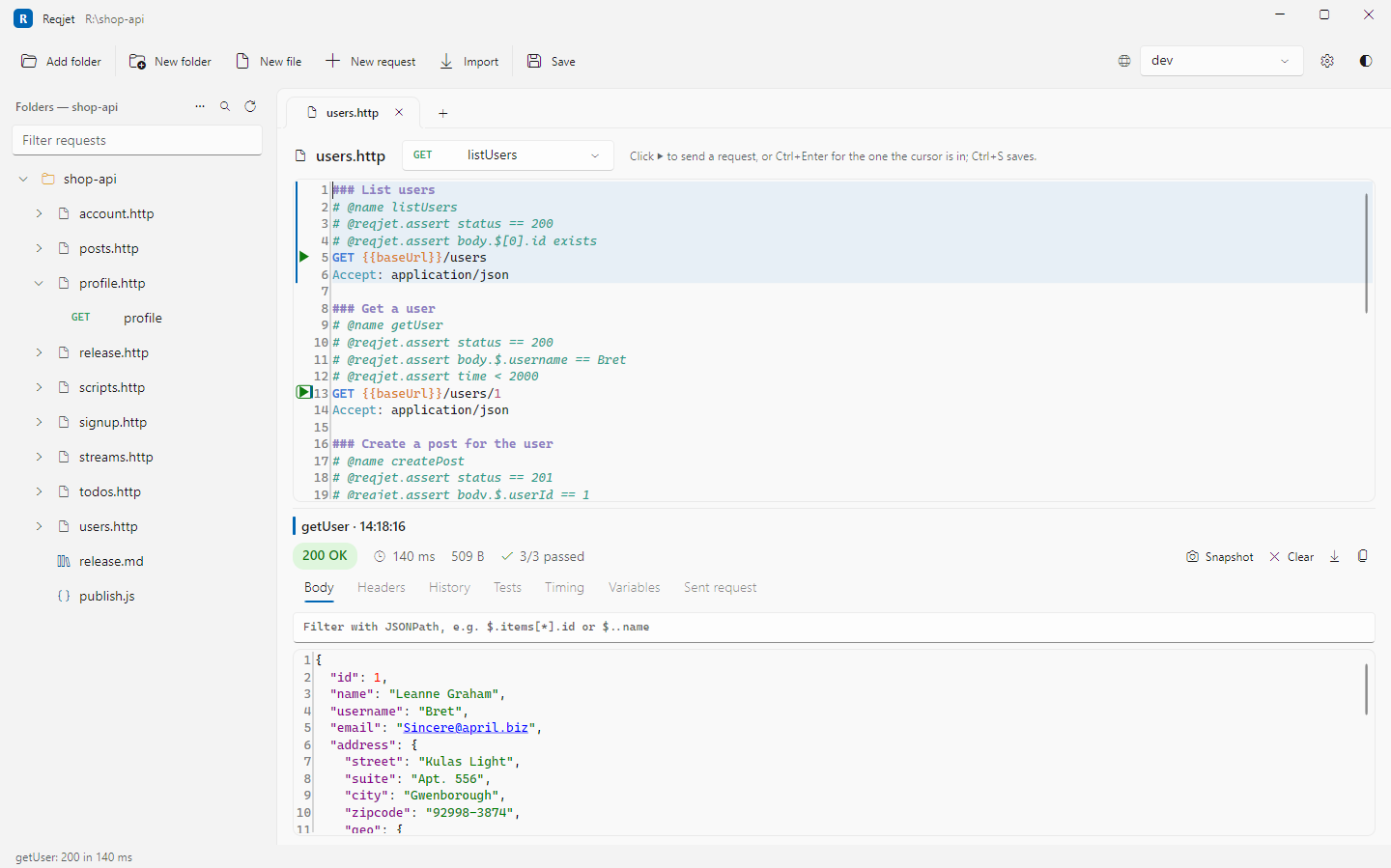
Reqjet saves every request as a plain .http file next to your code. Send them, test them, mock them, load test them and run them in CI, all from the same files your IDE already understands.
Opens the same .http files as
Your files, your repo
Requests are text files, not a database
Nothing is locked in an app or synced to someone else's cloud. Requests live in folders on disk, get reviewed in pull requests and diff like code.
- Form and text, one document. Edit a header in the form and only that line changes. Comments, spacing and line endings are kept.
- Environments you already have. Reads
http-client.env.json, the private.userand JetBrains files, and VS Code REST Client settings. - Chaining built in. Use one response in the next request, and the request it depends on is sent first if it needs to be.
- Portable extras. Reqjet's own features are comment directives, so other tools just ignore them.
@baseUrl = https://api.example.com

### Sign in
# @name signIn
POST {{baseUrl}}/auth/token
Content-Type: application/json

{ "user": "{{user}}", "password": "{{password}}" }

### Get a pet
# @reqjet.assert status == 200
# @reqjet.assert body.$.name exists
GET {{baseUrl}}/pets/7
Authorization: Bearer {{signIn.response.body.$.token}}
Features
The tools you reach for, in one fast desktop app
From a quick GET to a full regression suite, without switching tools.
Tests from responses
Right-click a value to assert on it, press Snapshot to lock in a whole response, or check every reply against your OpenAPI contract.
See how it worksScripts that travel
JetBrains-style pre-request and response scripts run in a sandbox, and Postman's pm.* API works too, so imported collections run as they are.
Data-driven runs
Point a file at a CSV or JSON data file and it runs once per row, with pass or fail for each.
See how it worksMock server
Serve your saved responses and OpenAPI examples on localhost, so the front end can be built before the API exists.
See how it worksQuick load test
Will it cope with 50 at once? Get requests per second, p50 to p99, a histogram and pass/fail thresholds. Export it as a k6 script when you need more.
See how it worksRunbooks
Markdown docs where each ```http block has a Run button. Multi-step operations come with their instructions, and they still read fine on GitHub.
Import your collections
Bring in Postman and Insomnia collections, OpenAPI descriptions, pasted cURL commands, and browser recordings (HAR) with credentials kept private.
See how it worksSign-in built in
OAuth 2.0 flows with token caching, Digest, AWS Signature V4, Windows NTLM and Negotiate, client certificates (mTLS) and proxies.
See how it worksSee what really happened
Redirect chains, timing, TLS and certificate details, decoded JWTs, cookies and why they were rejected, a CORS check, and HAR export for bug reports.
See how it worksCompare environments
Send the same request to staging and production and see the difference, down to each JSON value. History compares any response with earlier ones.
See how it worksWebSockets and SSE
Connect to WebSockets and server-sent event streams from the same .http files, and watch the messages as they arrive.
Copy as code
Turn any request into cURL, C#, JavaScript, Python, Go, Java or PowerShell, with the environment's values filled in.
See how it worksScreenshots
A closer look
Real screenshots of the app, taken on Windows.
Testing
Turn a response into a test in one click
Tests are written into the .http file, so they're shared with the requests and run wherever the requests do: in the app, in a Run tab, in a runbook or in your pipeline.
- Assertions on status, headers, timing and any JSON path, added by right-clicking a response value.
- Snapshots that save a response and flag what changed, while ignoring the values that always change.
- Contract checks that compare every response with the OpenAPI description you name.
- Clear failures such as "status was 404" or
$.price: 10 → 12, not just a red cross.
✓ orders.http  Sign in             200   92 ms
✓ orders.http  Create order        201  184 ms
✓ orders.http  Get order           200   61 ms
✗ orders.http  Cancel order        409   77 ms
    status was 409, expected 204
✓ pets.http    List pets           200   58 ms
✗ pets.http    Get a pet           200   64 ms
    Differs: $.price: 10 → 12
✓ pets.http    Upload photo        200  311 ms

7 requests  5 passed  2 failed  847 ms
Command line
The same files, checked on every build
The reqjet command line runner uses the same environments, scripts, chaining and assertions as the app, so the requests you click through are the ones your pipeline checks.
- JUnit reports for GitHub Actions, Azure DevOps, GitLab and Jenkins.
- Markdown summaries that show on the GitHub Actions run page.
- Load tests and mocks from the command line too, with exit codes that fail the build.
$ reqjet run api/ --env staging --junit results.xml
✓ 24 passed  in 3.2 s

$ reqjet run api/users.http --data users.csv
✓ 12 rows, 36 passed

$ reqjet load api/pets.http --name getPet \
    -n 1000 -c 20 --max-p95 300ms
  412 req/s · p50 38 ms · p95 121 ms · p99 188 ms
✓ Passed: p95 121 ms ≤ 300 ms, 0% failed

$ reqjet mock api/ --port 4010
  Serving 18 routes on http://localhost:4010
Built with care
Fast, private, and yours
Secrets stay secret
Tokens and passwords are masked until you reveal them. Private env files are kept out of git, and HAR exports hide credentials.
No account, no tracking
There's no sign-in and no telemetry. The only thing it sends on its own is a daily check for updates, and you can turn that off.
Keyboard first
Go to any request with Ctrl P, use the command palette, search everything, and get suggestions for variables and headers as you type.
Native everywhere
One self-contained download for Windows, macOS and Linux, on x64 and Arm. Light, dark and high-contrast themes.

Ready to send some requests?
Download Reqjet for your system. There's no account to create, and you can open the .http files you already have.